The Outbound Growth’s Playbook: Fixing 17 Leaks in B2B Outbound Strategy for 2026

B2B Outbound Strategy Playbook 2026: Integrating Inbound, Outbound, and HubSpot
Scaling with AI and Tactical Upgrades for 2026
Summary : Reading time 60 sec
Getting straight to the tactics. If you don’t have time to read the full guide right now, here is the signal amidst the noise:
- Your Strategy Isn’t Broken, Your Execution Is: 90% of outbound failure today isn’t bad copy—it’s dirty data, weak deliverability, and single-threaded outreach. Fix the “leaks” before you scale volume.
- AI is for Research, Not Just Writing: The biggest 2025 lever is using AI (like Clay) to research prospects before you email. Generic “Insert Name” personalization is dead; insight-driven relevance is the new standard.
- Stop “Single-Threading” Deals: The average buying committee now has 10+ stakeholders. If you aren’t running coordinated multi-channel sequences to the Economic Buyer, Technical Evaluator, and User Champion simultaneously, you will stall.
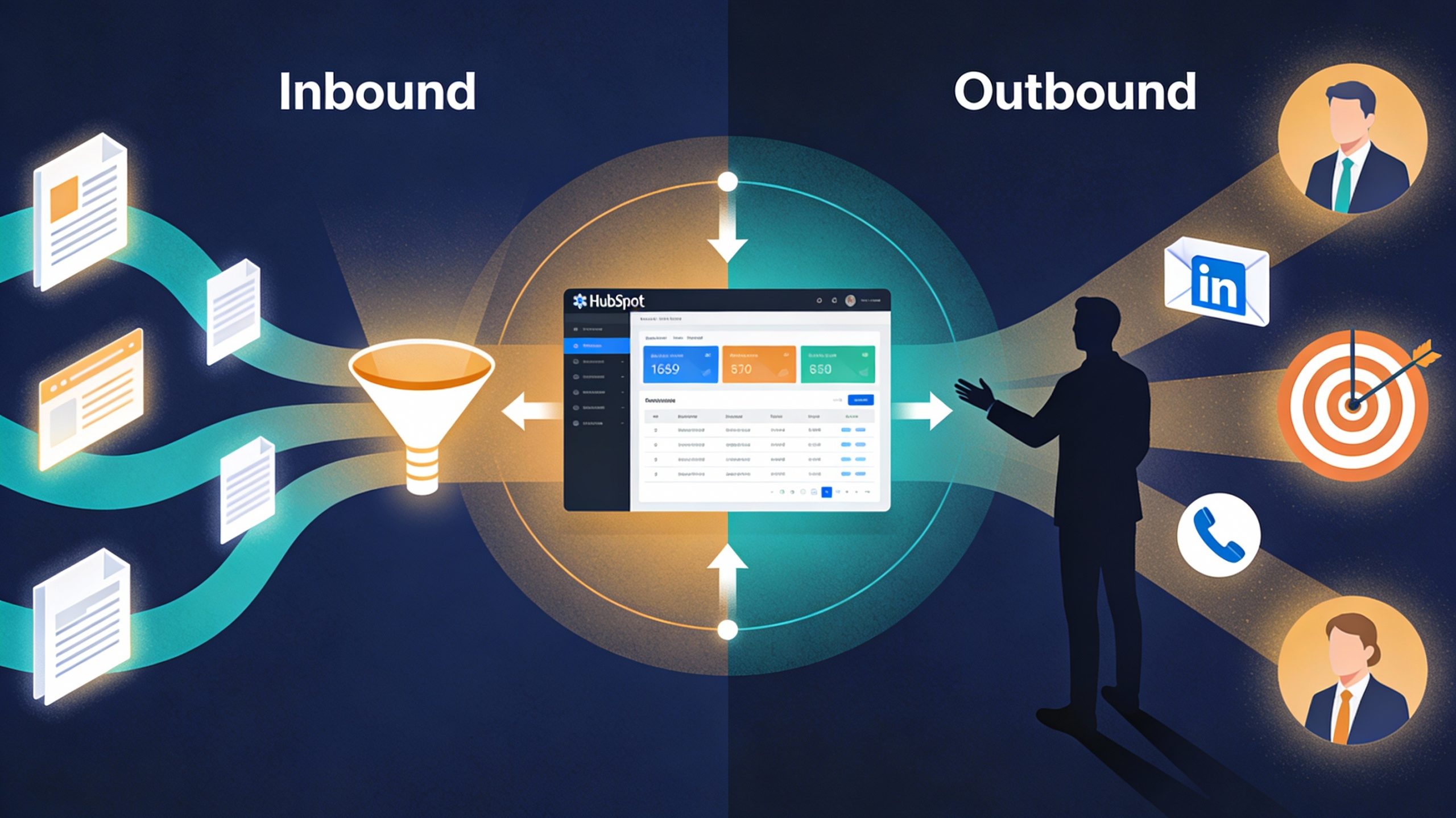
- Fusion is the Future: Treat Inbound and Outbound as one engine. Use your highest-converting inbound content as collateral in your cold outbound, and use outbound objections to fuel your content calendar.
- HubSpot is Your Orchestration Layer: Stop using it just as a database. Use multi-touch attribution to prove ROI and automated workflows to trigger outreach based on intent signals (like pricing page visits), not just time delays.
Your B2B outbound engine is broken, but not where you think it is
Most B2B growth leaders blame messaging, sequencing, or targeting. They’re wrong. The real leaks aren’t strategic failures; they’re execution gaps at the intersection of sales, marketing, and technology. And in 2025, when 82% of sales teams are leveraging AI but 40% face privacy compliance issues, the cost of getting these details wrong isn’t lost emails. it’s lost deals and damaged reputation.
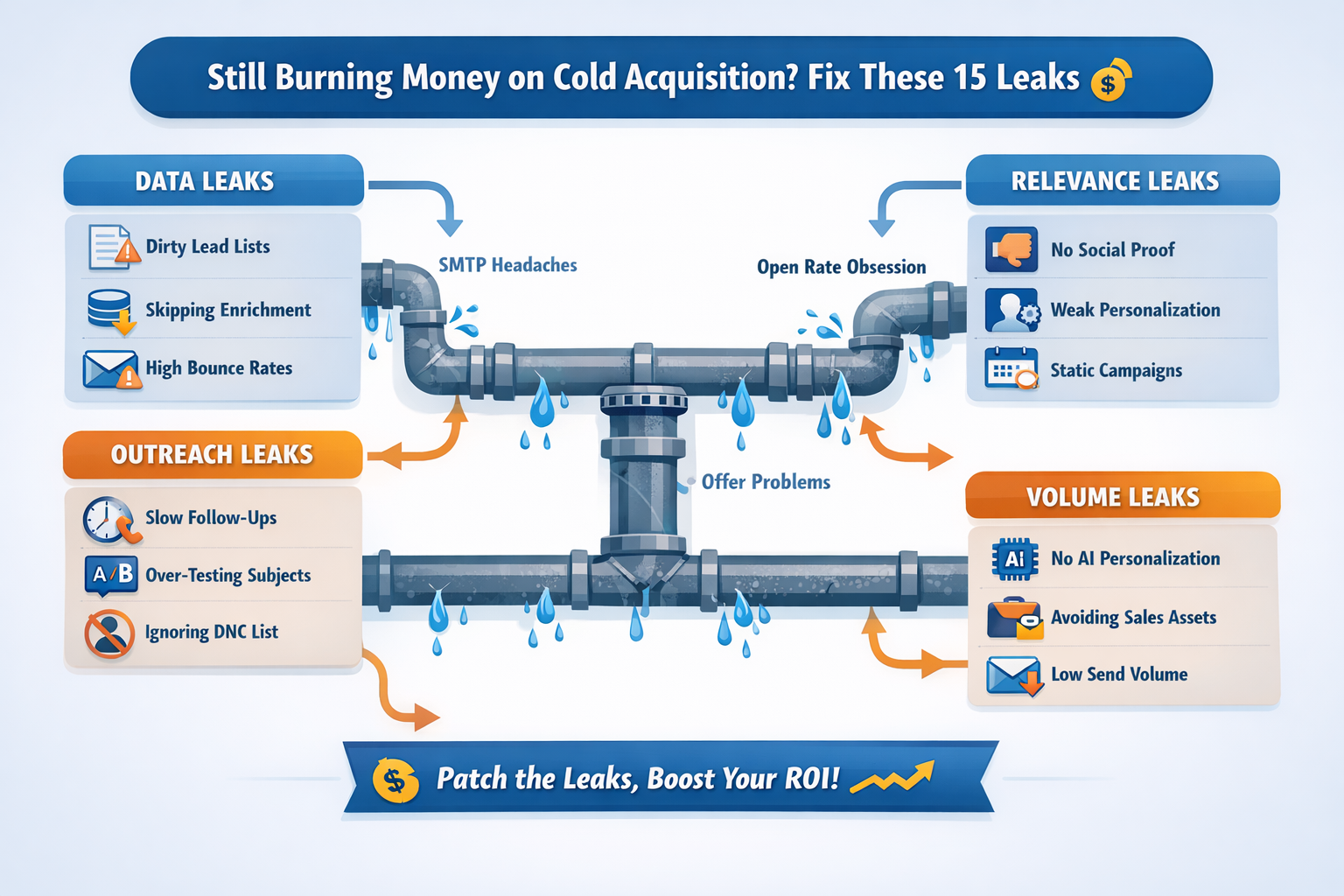
This guide updates the 17 original cold acquisition leaks with modern 2025 realities: AI-driven personalization, multi-threaded selling into buying committees of 10+, inbound-outbound fusion strategies, and HubSpot-specific optimisations that actually move the pipeline.
Part 1: The Classic Execution Leaks
1. Sending Dirty Company Names: Without AI Enrichment Context
The old problem: Messy company names hurt deliverability and personalisation.
The 2025 reality: Just cleaning names isn’t enough. You need contextual enrichment alongside clean data.
Modern fix: Use AI-powered data enrichment platforms (like Clay) to standardise company names and simultaneously pull:
- Recent funding announcements
- Headcount changes
- New product launches
- Hiring patterns in your target function
This transforms a “clean name” into an intent signal. A prospect from a company that just raised Series B and hired 5 sales reps is fundamentally different from a prospect at a stable company. You’re not just fixing data you’re building predictive signals into your list.
HubSpot action: Create a workflow that tags contacts enriched with funding signals for priority outreach sequencing. Use HubSpot’s custom properties to capture enrichment data, then segment accordingly.
2. Skipping Waterfall Enrichment: Replaced by Multi-Layer Intent Stacking
Old leak: Single-source data creates quality gaps.
2025 upgrade: Waterfall enrichment is table stakes. The real lever is intent signal stacking, combining first-party (your website, email engagement, content downloads) with third-party (intent providers, funding data, org charts, social listening).
Modern framework:
|
Signal Tier |
Source | Conversion Impact |
Example |
| Tier 1: Direct Intent | Website visits, content downloads, product research, competitor searches | 52% conversion | Multiple pricing page visits + whitepaper download |
| Tier 2: Research Signals | Industry content, peer review sites, solution category searches, budget research | 28% conversion | Regular LinkedIn engagement on your content + Capterra reviews |
| Tier 3: Organizational Signals | Funding, hiring, department expansion, technology changes | 12% conversion | Recent Series B, hired 2 sales VPs, expanded engineering team |
| Tier 4: Behavioral Signals | LinkedIn profile views, content engagement, email opens (contextual) | 8% conversion | Viewed your profile 3x, engaged with 2 posts, opened emails |
HubSpot setup: Use HubSpot’s API or native integrations (6sense, Demandbase, etc.) to ingest intent signals and auto-tag contacts. Build lead scoring models that weight Tier 1 signals 10x higher than Tier 4. When a Tier 1 signal triggers, immediately enroll hot prospects into your high-touch sequence.
3. Not Calling Leads After Positive Replies: But Make It AI-Informed
The original fix was right: Speed wins. Calling within 5 minutes of a positive reply beats email follow-up.
2025 enhancement: Add AI context before you call.
When someone replies positively:
- Instantly pull context: Use an AI agent to research their LinkedIn, recent announcements, role changes, company news in the past 30 days
- Prepare a hook: Reference something specific (“I saw you were promoted to VP of Sales last month”)
- Call within 3 minutes (not 5) with that context in hand
- Leave a voicemail that proves you’ve done research
- Follow up via email with the specific insight as the bridge
This isn’t just speed—it’s informed speed. You’re not cold-calling; you’re demonstrating you’ve done the work
HubSpot integration: Create a workflow that triggers when a reply comes in. It should:
- Automatically create a high-priority task with a deep-link to the contact’s LinkedIn profile and recent company news (pulled via Clay or Apollo integration)
- Log the timestamp to track response velocity metrics
- Auto-enroll in a post-call follow-up sequence
4. Over-engineering SMTP & Deliverability: Now a Compliance Risk
Original issue: Cheap SMTP kills deliverability.
2025 reality: Deliverability is non-negotiable, but so is compliance. 60% of enterprises will use AI for GDPR compliance by end of 2025. Every email sent from a cheap setup risks your domain reputation and legal exposure.
Modern standards:
- Use dedicated SMTP providers (Sendgrid, Postmark, AWS SES) with proper authentication (SPF, DKIM, DMARC)
- Implement warm-up sequences (Warmbox, Lemlist) that gradually increase sending volume and maintain sender reputation
- Keep bounce rates below 1% (not just 2%)
- Maintain a clean, updated DNC (Do Not Contact) list with legal holds
- Use multi-domain rotation to spread sending volume (4 inboxes per domain max, 10-25 emails/inbox/day)
Compliance overlay: Document all email lists with consent trails. If you’re buying lists, verify they’re GDPR-compliant at source. Add a Privacy Disclaimer footer to every campaign, and ensure your unsubscribe links work flawlessly
5. Obsessing Over Open Rates: But Track AI-Friendly Metrics Instead
The original diagnosis was correct: Open rates are unreliable.
The fix: Stop tracking opens. Start tracking:
- Reply rate (people responded—that’s intent)
- Click-through rate on high-value assets (they engaged with your content)
- Meeting conversion rate (they took the next step)
- Sales-qualified lead creation (they fit your ICP)
- Pipeline influenced (HubSpot closed-lost pipeline trace back to your outreach)
These metrics directly correlate with revenue. Opens don’t.
HubSpot dashboard: Build a custom KPI dashboard in HubSpot that tracks:
- Sequence reply rate by segment
- MQL → SQL conversion by campaign source
- Average sales cycle length by acquisition channel
- Closed-won revenue influenced by outbound sequences (using HubSpot’s multi-touch attribution)
6. Ignoring Your DNC (Cold email deliverability) List: But Automate It Now
Old fix: Maintain a DNC list. Still true, but now automate it.
2025 upgrade:
- Auto-add anyone who unsubscribes to a DNC property in HubSpot
- Create a workflow that flags contacts as “Do Not Contact” if they’ve explicitly declined
- Audit your DNC list monthly for compliance and accuracy
- Sync your DNC list to all outreach platforms (email, LinkedIn, calling tools) to prevent accidental outreach
Why this matters now: GDPR fines reach €20M+ for violations. A single email to someone on your DNC list can trigger a complaint. Automation removes human error.
7. Over-Testing Subject Lines: But A/B Test the Right Variables
Original insight: Valid. Endless subject line testing wastes time.
2025 addition: Instead of testing 20 subject lines, test high-leverage variables in parallel:
- Subject line (2-3 variants)
- CTA strength (soft: “thoughts?” vs. hard: “book a 15-min call?”)
- Personalization depth (basic name vs. AI-researched insight)
- Send time (based on recipient timezone + predicted engagement window)
- Email copy length (2 sentences vs. 4)
- Sales asset (case study vs. guide vs. whitepaper)
AI tools now predict which combination will work for each prospect based on their profile, role, and engagement history. Don’t test; predict and personalise
Proven subject line staples (2025 updated):
- quick question for {{name}}
- {{function}} question + something specific (e.g., “Sales ops question—HubSpot sequences”)
- [Company] just hired 5 people in sales. We should talk (specific trigger)
- {{name}}, 2-min thought on {{topic}} (specific to their role)
- Your [recent_article/announcement] caught my eye (references their content)
8. Not Using Custom Variable Pulls: But Do It At AI Scale
The original recommendation stands: Pull case study names, colleague names, product references.
2025 evolution: Use AI-generated personalization tokens that go 10 levels deeper.
Set up Clay (or similar) to automatically pull:
- Company-specific context: Recent funding, hiring, product launches, earnings calls, press mentions in the past 60 days
- Peer reference: “Two other {{industry}} companies using {{solution}}: {{company_1}} and {{company_2}}” (pulled from your customer base)
- Role-specific challenge: “VP of Sales at {{company_size}} companies typically struggle with {{pain_point}}. Here’s how {{customer_name}} solved it”
- Competitive intelligence: “I noticed you’re using {{competitor_product}}. Here’s why {{your_company}} is moving teams away from it”
- Personality-adapted messaging: Use Humantic or Clearbit Enrichment to predict their communication style (direct vs. consultative vs. data-driven) and adjust email tone accordingly
HubSpot integration: Create custom contact properties for each variable, then feed them into your email sequences via HubSpot workflows. Every variable should be sourced and timestamped so you know it’s fresh.
9. Keeping Campaign Timing Static: Now Layer in Intent-Based Triggers
Original fix: Vary start times and warm-up keywords to look human.
2025 upgrade: Make timing intent-responsive, not just randomized.
Modern timing strategy:
- Day-parting: Send emails when prospects are most likely to open them (Tuesday-Thursday, 9-11 AM recipient local time). AI can predict this per person
- Intent-triggered sends: When a prospect visits your pricing page, they get an email that same day (within 6 hours) that references pricing. When they download a whitepaper, follow up within 12 hours with a related asset
- Buying committee timing: If you’re multi-threading, stagger your outreach across roles. Send to the economic buyer on Day 3, the technical evaluator on Day 5 (so your economic buyer has time to champion you first).
- Avoid predictability: Random 1-3 hour delays between sequences (not exactly 24 or 48 hours).
HubSpot automation: Set up conditional workflows that trigger on website activity (using HubSpot’s website tracking or third-party intent provider integration). Example: if someone visits pricing page + stays for 2+ minutes, enroll in “Hot Intent – Pricing Inquiry” sequence that sends same day.
10. Ignoring Offer Quality: It’s Your Real Conversion Lever
The diagnosis is bulletproof: Bad offer = bad conversion, regardless of copy.
2025 framework: Your offer must solve a specific pain point at a specific timeline.
Weak offer example: “Let’s chat about how we help companies like yours grow faster”
Strong offer example: “In the next 90 days, we typically help VP of Sales hires reduce their ramp time by 40% through [specific process]. Can we grab 20 minutes to see if that’s relevant?”
The second offer is:
- Specific (VP of Sales hires, 90 days, 40%, defined benefit)
- Time-bound (90 days)
- Low commitment (20 minutes, not a 1-hour demo)
- Relevant to their job (reducing ramp time)
Tiered offer strategy by prospect temperature:
| Prospect Tier | Offer | CTA |
| Cold | Relevant insight, case study, or industry benchmark | “Worth a quick look?” or “Curious if this applies to your team?” |
| Warm (Intent Signal) | Free audit, assessment, or brief consultation | “Can we spend 20 mins reviewing your setup?” |
| Hot (Reply Positive) | Demo with specific use case, implementation timeline | “When can we schedule—Monday or Tuesday?” |
| Qualified Lead in Sequence | Direct conversation with deal owner | “Let’s set up a 45-min call with [name] to discuss implementation” |
11. Avoiding Social Proof: But Weaponize It Strategically
The original fix was incomplete: Collect testimonials, yes. But personalize which proof you show to whom.
2025 approach:
- Collect proof at scale: Ask for testimonials from every closed deal. Make it easy (send a form, record a quick video)
- Segment proof by use case: Different proof for different buyer personas
- VP of Sales? Use proof from other sales leaders on quota attainment or efficiency gains
- VP of Marketing? Use proof from marketers on lead quality or pipeline influence
- VP of Engineering? Use proof from technical leaders on implementation speed or integration ease
- In-email personalization: Reference case studies or testimonials directly in cold email that match their role and use case
- Proof in sales assets: Your guides, decks, and whitepapers should reference customer names and results (with permission)
HubSpot setup: Create a proof asset library in HubSpot. Tag each case study/testimonial by industry, use case, company size, and buyer persona. Use dynamic content in email sequences to pull in the most relevant proof for each prospect.
12. Slow Response Time on Positive Replies: Now Target Sub-5-Minute Closes
Original guidance holds: Speed wins. Every minute matters.
2025 enhancement: Automate the first touch, humanize the second.
When a prospect replies positively:
- Within 2 minutes: Auto-send a tactical acknowledgment (5-line email) that shows you read their reply and next steps
- Within 5 minutes: Call them (with research context, as mentioned in leak #3)
- Within 15 minutes: Send a personalized follow-up email with a calendar link to book a meeting
This hybrid approach keeps the momentum without feeling robotic
HubSpot workflow: Create a workflow triggered on “received new email from contact.” First action: send pre-written, but personalized, acknowledgment email. Second action: create high-priority task for rep to call + research contact. Third action: wait 10 minutes, then send meeting request email.
13. Letting Bounce Rate Cross 2%: But Now Make It a Real-Time Metric
The warning is still valid, but 2025 demands more rigor.
New standard: Keep bounce rate below 0.8%. Here’s why:
- Above 1%: Signals poor data quality or list health problems
- Above 0.5%: Indicates potential spam filter triggering
- Real-time monitoring: Check bounce rates daily, not weekly
Modern fix:
- Use double verification (MV + Scrubby, or Apollo + RocketReach) before sending any campaign
- Monitor bounce rates per domain and per SMTP connection
- Flag accounts with increasing bounce rates immediately (sign of deliverability decay)
- Maintain separate “warm” and “cold” sender inboxes; never send both high-volume cold and crucial warm outreach from the same address
HubSpot tracking: Create a dashboard that shows bounce rate by sending domain, date, and segment. Set alerts if any domain exceeds 1% in a day.
14. Skipping Double Verification: Now Automate It in Your Stack
Original fix: Double verification improves deliverability. Still essential.
2025 workflow: Automate verification in your list-building pipeline.
Tech stack approach:
- Scrape leads (Apify, RocketReach, or LinkedIn)
- Find emails (LeadMagic, Apollo, or RocketReach)
- Enrich with intent data (Clay, Apollo)
- First verification (Apollo or RocketReach built-in verification)
- Second verification (Scrubby or MV)
- Bounce check post-send (Smartlead or Lemlist auto-logging)
Each step removes invalid emails before they hurt your reputation.
HubSpot integration: Use Zapier to connect your verification tool to HubSpot. When an email is verified, it updates the contact’s email field and adds a “Verified Email” property with a timestamp. Unverified emails get tagged and held from sending.
15. Obsessing Over Campaign Perfection Instead of Volume: But Smart Volume
This insight is gold: Perfectionism kills outbound.
2025 framing: Volume with smart segmentation beats perfected copy to a small list.
The formula:
- Start with 500-1000 cold prospects in a segment
- Use the same 3-email sequence for all of them
- Measure reply rate, meeting rate, and deal rate
- Only optimize when you have data (50+ replies minimum)
- Once you find a winner, increase volume into that segment 2-3x
- Parallel-test a new segment or angle with equal volume
This approach scales revenue while maintaining personalisation
HubSpot playbook: Create a sequence performance dashboard that shows:
- Total sends per sequence
- Reply rate (%)
- Booked meetings from sequence
- SQL conversion rate
- Closed-won revenue influenced
Use this to decide: scale this sequence or pivot to a new one?
16. Avoiding AI Personalisation Because It Feels Corny: Stop This Now
The original point was prescient. AI-driven personalisation is non-negotiable in 2025.
Modern framework: AI Personalization Maturity Model
| Level | Approach | Reply Rate Lift | Effort | Tools |
| Level 1: Basic | First name + company name | +5-10% vs. no personalization | Low | Templates + manual variables |
| Level 2: Research-Driven | Add role-specific context, company info, recent news | +15-25% lift | Medium | Clay, Apollo, HubSpot data |
| Level 3: Behavioral | Add content engagement, website activity, email history | +25-40% lift | Medium-High | HubSpot tracking + intent data |
| Level 4: Predictive | AI predicts messaging tone, timing, offer based on similar profiles | +35-50% lift | High | AI SDR (11x, Artisan, Alice) |
| Level 5: Hyper-Personalisation | Real-time dynamic content + predictive personalization + multi-channel sync | +50-70% lift | High | Alice, Landbase, Clay + advanced CRM |
Why it works: 74% of B2B buyers respond to relevant emails. AI identifies relevance patterns humans miss.
Ethical guardrail: Be transparent about AI use. Add a footer: “This email was crafted using AI-assisted research to provide relevant insights.” Compliance + trust
HubSpot implementation: Use HubSpot’s AI email features (summaries, tone adjustment) combined with third-party AI SDR integrations (11x, Alice) that write personalized body copy.
17. Only Using Direct-Response Emails: Activate Your Sales Asset Engine
Original insight (the final point in your list) is critical: Not every email should ask for a meeting.
2026 distribution strategy:
| Email Step | Purpose | Asset | CTA |
| Email 1 (Initial) | Grab attention with insight/problem statement | Personalized 1-liner or insight | “Worth a thought?” |
| Email 2 (Value) | Provide genuine value, prove expertise | Case study or guide matched to their use case | “Curious if this applies?” |
| Email 3 (Proof) | Show how you’ve solved similar problems | Specific customer example or ROI benchmark | “Should we explore further?” |
| Email 4 (Social Proof + Pressure) | Combine authority + mild urgency | 3rd-party testimonial or competitive positioning | “Let’s talk briefly” |
| Email 5 (Re-engagement) | Final attempt with a different angle | Alternative offer or insight they haven’t seen | “One more thought—then I’ll let you go” |
Each asset should be customised (insert their company name, role, recent context, not just their first name).
HubSpot setup: Build a 5-step sequence in HubSpot where:
- Each step is separated by 3-5 days
- Email copy varies by persona (use dynamic content blocks)
- Sales assets are personalised via custom properties (company, role, challenge)
- Track which asset generated clicks, then optimise your asset mix
Part 2: The 2026 Upgrade Outbound with Inbound Fusion
18. Ignoring the Inbound-Outbound Flywheel
The biggest leak most growth teams miss: Treating inbound and outbound as separate functions.
2025 reality: Only 8% of companies achieve real sales-marketing alignment, yet aligned companies grow 19% faster and are 15% more profitable. Your outbound is 50% less effective if your inbound isn’t feeding it.
The fusion model:
Tier 1: Inbound Content Fuels Outbound Targeting
- Track which content pieces your ICPs consume (blogs, guides, webinars, case studies)
- Use those content pieces in your outbound sequences to people who haven’t seen them
- Reference the content in your cold email (“Saw you haven’t read our guide on X yet—it’s relevant to your role”)
- Create intent segments: “Downloaded whitepaper but didn’t watch webinar” → nurture sequence toward the webinar
Example: Your engineering audience is consuming your “Infrastructure as Code Best Practices” guide. Identify companies in your target list whose engineering leaders haven’t accessed it. Outbound sequence references it directly.
Tier 2: Outbound Meetings Generate Inbound Content Themes
- Every sales call teaches you something about buyer pain points
- Log these insights into HubSpot and funnel them to your marketing team
- Create content around these real-world problems (not abstract buyer challenges)
- Repurpose that content back into outbound sequences
Example: Three outbound calls this month from prospects using Salesforce revealed they all struggle with data sync into their warehouse. Create a 2-week content sprint: guide, video, case study on “Salesforce to Warehouse Sync Without Custom Build.” Outbound teams can reference this newly-created proof within 30 days.
Tier 3: Multi-Touch Attribution Proves ROI of Both Channels
- Most teams can’t answer: “How much revenue did outbound generate vs. inbound?”
- HubSpot native multi-touch attribution (or tools like Segment, Attribution, Mixpanel) answer this
- Set a 90-180 day attribution window (outbound cycles are longer)
- Use U-shaped attribution: 40% credit to first touch (often inbound content), 40% to last touch (often outbound call), 20% to middle touches
- This data proves inbound deserves budget (it creates awareness and early-stage leads) and outbound deserves budget (it closes deals)
HubSpot setup:
- Tag every deal with the source (Inbound, Outbound, or Both)
- Build a dashboard showing “Pipeline Influenced by Channel”
- Report monthly on CAC by channel and payback period
- Share this with the team—proving outbound’s ROI aligns everyone
Tier 4: Account-Based Multi-Channel Campaigns
- Pick 100 high-value accounts
- Run coordinated campaigns across:
- Inbound: LinkedIn ads + content marketing targeting that account
- Outbound: Email + phone outreach to 3-5 buying committee members
- Engagement: Sales rep manual LinkedIn outreach + connection requests
- Measure impact: Did the account move from “cold” to “demo scheduled” faster than non-ABM deals?
19. Missing the Multi-Threading Buyometer
Your ICP now involves 10-11 decision-makers, not 3-4. Single-point-of-contact deals are dying
Map the buying committee by role:
| Role | Title Examples | Primary Concern | Your Pitch |
| Economic Buyer | CFO, VP Finance, VP Sales | ROI, risk, vendor stability | Lead with financial impact + competitive positioning |
| Technical Evaluator | VP Eng, CTO, Tech Lead | Integration, implementation, security | Lead with architecture, API docs, security posture |
| User Buyer | Sales reps, ops managers, team leads | Usability, workflow fit, adoption | Lead with ease of use, team enablement |
| Champion | Likely a director or senior IC who brought you in | Their internal credibility | Provide them with internal selling materials |
| Influencer/Blocker | Often a peer or cross-functional lead | Status quo preservation | Address their specific objection early |
Execution playbook:
- Month 1: Outreach to the champion (usually easiest) + economic buyer (highest authority)
- Month 1-2: Once champion is engaged, ask them: “Who else on your team would need to weigh in?” → Add technical evaluator + user buyer
- Month 2: Provide the champion with internal selling materials: “Here’s a summary you can share with your boss”
- Month 2-3: Direct outreach to technical evaluator (copy champion on context), then user buyer
- Month 3+: Run joint calls with multiple stakeholders; use the champion to broker alignment between groups
Email sequencing across roles (HubSpot implementation):
- Create separate sequences for each buying committee role
- Stagger outreach: champion Day 1, economic buyer Day 3, tech evaluator Day 5, user buyer Day 7
- In each sequence, reference the relationship with the other stakeholders (“Your team champion [Name] mentioned…”)
- Provide role-specific assets: financial impact for economic buyer, technical spec sheet for evaluator
20. Email & LinkedIn Outreach Mismatch
The gap: You send a cold email on Day 1, but don’t engage on LinkedIn until Day 5. Prospects see them as unconnected.
2026 approach: Synchronized multi-channel cadences
Proven 5-step sequence structure:
| Day | Notes | ||
| 1 | Personalised intro email (interest hook) | LinkedIn connection request with personalised note (in the request) | Same research, different channel. Shows consistency. |
| 2 | — | Profile view + like their recent post | Subtle awareness without being pushy. |
| 3 | Valuable asset email (case study or guide) | Thought-provoking comment on their recent post or article | Adds context; shows you’re engaged with their work. |
| 4 | — | InMail with alternate angle (if no reply to email yet) | InMails get 18-25% reply rate vs. 3% cold email. This is your power move. |
| 5 | Final follow-up (soft CTA) | LinkedIn message if connected (“Wanted to check in…”) | Final attempt before pause; respects their time. |
Why this works:
- LinkedIn messages get 10.3% response rate (2x email)
- Multi-channel reinforces credibility (“They’re not just emailing; they’re engaged on LinkedIn”)
- Different channels reach different mental states (email = professional inbox; LinkedIn = scrolling feed)
- Strategic personalization can drive 30-50% positive reply rates
HubSpot and LinkedIn integration (use Hublead or similar):
- Create HubSpot sequences with “LinkedIn tasks” (which remind you to send connection requests, InMails, profile views)
- While HubSpot doesn’t fully automate LinkedIn, third-party integrations like Hublead add LinkedIn steps directly into sequences
- Sync LinkedIn conversations back to HubSpot automatically
- Track LinkedIn engagement (profile views, message replies) as a property on the contact
- Build workflows that trigger off LinkedIn activity (“If LinkedIn message opened, enroll in demo sequence”)
21. Ignoring Intent-Driven Prioritisation
The leak: You mail 1000 cold prospects equally. Only 50 have actual buying intent.
2025 fix: Intent Scoring + Automation
Tier 1 intent signals (act immediately):
- Multiple visits to your pricing page
- Downloaded your ROI calculator or case study
- Attended your webinar or event
- Clicked multiple links in your cold email (showing engagement)
- Change-based signal: New VP or Director hired in their target department
- Funding announcement (Series B/C)
Tier 2 intent signals (nurture actively):
- Content consumption (viewing your blog, LinkedIn engagement)
- Competitor research (using G2, Capterra, visiting competitor sites)
- Industry-specific problem searches
- LinkedIn Sales Navigator profile views
Tier 3 intent signals (passive nurture):
- General company information access
- No specific engagement yet
The automation:
When a Tier 1 signal triggers, immediately:
- Enroll the prospect in a “Hot Intent” sequence (more aggressive, higher-value ask)
- Create a high-priority task for an SDR to call within 1 hour
- Alert their assigned account executive if they’re already in your CRM
- Multi-thread to 2-3 additional contacts at the company simultaneously
HubSpot setup: Integrate with an intent provider (6sense, Demandbase, or build custom via website analytics). When a Tier 1 signal is detected, automatically:
- Update a “Lead Temperature” property to “Hot”
- Enroll in highest-priority sequence
- Tag with the specific signal (e.g., “Pricing Page Visitor” or “Funded in 60 Days”)
- Create a task with a 1-hour deadline for outreach
Expected improvement: 2-3x higher response rates + faster sales cycles by focusing energy on high-intent accounts
22. Weak AI SDR tools for outbound SDR & Data Enrichment Stack
The leak: You’re not using modern AI tooling, so your personalization effort is manual and doesn’t scale.
2026 tech stack for modern outbound:
| Layer | Tool Examples | Function |
| Data & Enrichment | Clay, Apollo, RocketReach | Automated research, prospect enrichment, firmographic data |
| Intent Data | 6sense, Demandbase, Clearbit | Real-time buying signals, ABM insights |
| Email Sequencing |
HubSpot Sequences, Outreach, Saleshandy |
Multi-step campaigns, tracking, CRM integration |
| AI-Assisted Copy | Twain, Warmbox, 11x, Artisan | AI-written/edited emails, tone adjustment, personalization at scale |
| Reply Management | MasterInbox, Smartlead, Warmbox | Unified inbox, auto-response tracking |
| Warm-up | Warmbox, Lemlist | Domain/inbox warm-up, deliverability management |
| Call Integration | Kixie, Outreach, HubSpot calling | Power dialing, call tracking, CRM logging |
| LinkedIn Automation | Hublead, Linked Helper (ethically) | LinkedIn sequencing, message sync, Sales Navigator integration |
How they work together:
- Clay researches and enriches 500 prospects with company news, job changes, funding, LinkedIn data
- 6sense or Demandbase overlays intent signals
- Twain or 11x generates personalized email copy based on Clay’s research
- HubSpot Sequences (with Hublead) orchestrates email + LinkedIn outreach in sync
- Warmbox manages deliverability and inbox warm-up
- MasterInbox centralizes all replies
- Kixie (integrated with HubSpot) enables fast calling and automatic CRM logging
Expected output: 500 hyper-personalized, multi-channel campaigns launched in 2 days (vs. 4 weeks manually). Reply rates 2x-3x higher
Part 3: HubSpot-Specific Optimisation
23. Under-Leveraging HubSpot Sales Sequences for Multi-Channel Orchestration
The opportunity: HubSpot Sales Sequences are powerful but often used as simple email drip campaigns.
Advanced sequence strategies:
A) Conditional Branching Based on Engagement
- Email 1: Intro (sent to all)
- Branch 1A: If they opened + clicked → enroll in “Hot Engagement” sequence (harder asks, more value)
- Branch 1B: If they opened but no click → enroll in “Soft Nurture” sequence (educational content)
- Branch 1C: If they didn’t open → enroll in “Re-engagement” sequence (new angle, shorter copy)
This ensures people get the right message at the right time.
B) Multi-Touch with Tasks
- Email steps for proven messages
- Task steps for LinkedIn actions (connection request, profile view, InMail send)
- Task steps for phone calls with pre-call research
- Task steps for manual touchpoints
C) Intent-Triggered Sequences
- Create separate sequences for:
- “Website Visitor – Pricing Page” (high intent)
- “Content Downloader – Whitepaper” (mid intent)
- “Cold Prospect – No Prior Engagement” (low intent)
- Each sequence has different messaging, frequency, and CTA strength
D) Account-Based Sequences
- Create sequences specifically for target accounts
- Multi-thread: Sequence 1 to economic buyer, Sequence 2 to technical evaluator, Sequence 3 to user buyer
- In each sequence, reference the relationships: “Your colleague [Name] mentioned…”
HubSpot setup:
- Go to Sales Hub → Sequences
- Create sequence with email + task + branch logic
- Set delays (3-5 days between steps)
- Add conditional logic based on contact properties or engagement
- Use enrollment conditions to auto-enroll contacts from high-intent segments
24. Not Tracking Multi-Touch Attribution in HubSpot
The missing link: You know outbound generates pipeline, but you can’t prove it to finance.
HubSpot & Attribution workflow:
- Set up UTM parameters: Tag every campaign (email, ad, event) with source, medium, campaign parameters
- Example email: utm_source=outbound_email&utm_medium=email&utm_campaign=sales_sequence_nov2025
- Example LinkedIn ad: utm_source=linkedin&utm_medium=paid_social&utm_campaign=abm_target_accounts
- Configure HubSpot attribution:
- Go to Reports → Attribution Setup
- Choose attribution model (U-shaped recommended: 40% first touch, 20% middle, 40% last touch)
- Set attribution window to 90-180 days (not 30)
- Build custom reports:
- Revenue by Campaign Source (showing outbound email campaigns contributing X revenue)
- CAC by Channel (cost per acquisition for outbound vs. inbound)
- Pipeline Influenced by Campaign (how much pipeline did each sequence create?)
- Payback Period by Channel
- Share with leadership:
- “Our November outbound sequences created $XXX in pipeline (attributed revenue)”
- “CAC from outbound is $X vs. inbound at $X—which is more efficient?”
- “Average sales cycle from outbound motion is X days vs. Y days for inbound”
This transforms outbound from “activity metric” to “revenue metric.
The One Metric That Matters: Reply-to-Revenue Ratio
Stop measuring vanity metrics. Measure what actually converts to revenue.
Modern B2B growth teams track:
| Metric | Why | Owner |
| Sequence Send Volume | Volume creates data | SDR Lead |
| Reply Rate (%) | Are you getting engagement? | Campaign Manager |
| Booked Meetings (%) | Are replies converting to meetings? | SDR Manager |
| MQL → SQL Conversion (%) | Are meetings qualified? | Marketing Manager |
| SQL → Opportunity Conversion (%) | Do conversations move to deals? | Sales Manager |
| Opportunity → Closed-Won (%) | What’s the close rate? | Sales Manager |
| CAC by Campaign | What did outbound cost? | RevOps |
| LTV:CAC Ratio | Is outbound sustainable? | CFO |
| Payback Period (months) | How fast does it pay back? | CFO |
The sequence:
- Low reply rate? Fix offer, personalization, or targeting
- High reply, low meeting rate? Fix the call/meeting process (see leak #3)
- High meeting, low SQL? Fix qualification or product-market fit
- High SQL, low close rate? Fix deal strategy or pricing
Work backward from your leakiest stage.
Closing: Your 90-Day Action Plan
Week 1-2: Audit & Quick Wins
- Audit your current bounce rate, DNC list, and email authentication (SPF/DKIM/DMARC)
- Clean up company names using Clay + verify emails with double verification
- Set up HubSpot dashboard tracking reply rate, meeting rate, and revenue influenced by campaign
Week 3-4: Enable Your First AI Layer
- Implement Clay for basic enrichment (company news, funding, job changes)
- Set up intent signal tagging in HubSpot (create new properties for intent tier)
- Build a “Hot Intent” sequence that triggers on Tier 1 signals
Week 5-6: Multi-Channel Orchestration
- Design your first 5-step email + LinkedIn sequence (following the template in leak #20)
- Set up Hublead or similar to add LinkedIn tasks to HubSpot sequences
- Create your buying committee map for top 10 target accounts
Week 7-8: Attribution & Optimisation
- Enable HubSpot multi-touch attribution; tag all campaigns with UTM parameters
- Build attribution dashboard showing pipeline/revenue by campaign
- Run your first intent-driven campaign to 200 Tier 1 intent prospects
Week 9-12: Scale What Works
- Based on your data, which sequence has the best reply + meeting rate?
- Scale that sequence 2-3x in volume
- Parallel-test a new angle, persona, or company size with equal budget
Final Thoughts
Your cold outbound isn’t broken because of strategy. It’s broken because of execution gaps.
In 2026:
- Inbound and outbound aren’t separate: they’re one demand generation engine
- AI isn’t optional: it’s the difference between 5% and 20% reply rates
- Multi-threading isn’t a nice-to-have: it’s required with 10-person buying committees
- Attribution isn’t for finance: it’s for you to know what actually works
Fix these 17 execution leaks, layer in the 2026 upgrades, and use HubSpot as your orchestration platform. The result: pipeline growth without burning more budget.
Your growth teams will thank you.
Conclusion
Cold acquisition is a key sales and marketing technique that can create new business opportunities and drive growth by reaching out to unfamiliar potential customers. Despite its challenges, an effective cold acquisition strategy, especially when combined with a multichannel approach, can significantly benefit your business. Apply these tips to unlock the full potential of cold acquisition and discover new business opportunities.